

Start Here: Aura IDE
Aura IDE
Aura IDE is a desktop coding agent with a phone-side command center.
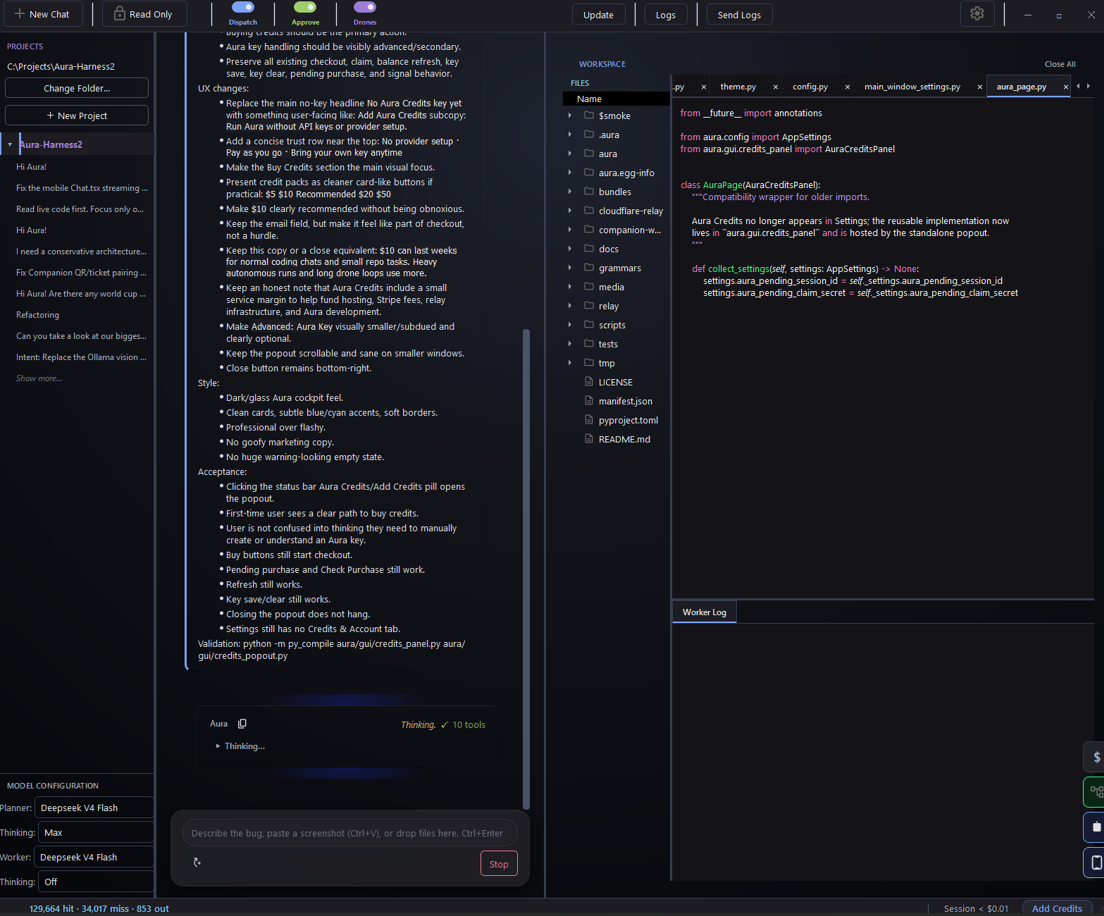
Aura works on real repos from a Windows desktop cockpit: it plans changes, edits files through reviewable diffs, validates work, and leaves receipts so you can see what actually happened.
It is not just another chat box with a file browser attached. Aura is built around an inspectable coding loop: visible plans, controlled writes, validation, project memory, provider flexibility, phone control, and user approval.
Start here
The core idea
AI coding agents need receipts, not vibes.
Most AI coding tools feel too much like a black box.
You ask for a change. The agent reads some files. It edits something. Maybe it runs a command. Maybe it says the task is done.
But as the user, you still need to know:
- What did it plan?
- What files did it touch?
- Did the write actually apply?
- Did validation run?
- Did it fix the real problem?
- Is it recovering from a real failure or thrashing on noise?
Aura is built around that trust problem.
Every serious coding agent needs a loop you can inspect: plan the work, do the work, validate the work, and leave a receipt.
How Aura works
Aura uses a two-role coding loop.
Planner
The Planner inspects your project, gathers context, and writes a focused work spec before files change.
Its job is to understand the request, identify likely files, reason about risk, and define what “done” should mean.
Worker
The Worker executes the approved spec.
It reads files, applies edits through controlled tools, runs commands when needed, and reports what happened. Writes are reviewable before they touch disk.
Validation
Aura surfaces validation, changed files, failures, recovery attempts, and completion receipts.
The goal is not blind automation. The goal is a coding loop where the user can see the plan, review the changes, validate the result, and understand the outcome.
What makes Aura different
Aura treats the harness itself as the product.
Not just the model.
Not just the chat box.
The harness: how context is gathered, how plans are formed, how edits are applied, how failures are reported, how quality is checked, and how the user stays in control.
Aura is built around:
- Planner / Worker separation
- visible workflow state
- controlled file edits
- reviewable diffs
- validation and recovery
- Worker completion receipts
- local project memory
- provider flexibility
- Companion phone control
- reusable Drones
- open-source code
- a desktop workflow for real repos
Aura can use hosted model access through Aura Credits, your own provider keys, or a mix of both.
Local-first does not mean every model must run locally. It means the repo, memory, workflow, and control surface belong to the user.
Aura Companion
Aura Companion turns your phone into a pocket command center for your desktop Aura session.
No separate app store install. Open the Companion page, pair your phone, and steer Aura from your browser.
From your phone, you can:
- browse projects and conversations
- open existing threads
- start new chats
- send messages to the desktop session
- dispatch approved specs
- watch work happen while Aura runs on your PC
- review status and receipts
The desktop still does the real repo work. The phone becomes the control surface.
Aura is not just a chat window. It is a cockpit. Companion makes that cockpit reachable from your pocket.
Aura Credits and BYOK
Aura supports two model paths.
Aura Credits
Aura Credits are the easiest way to start.
No API keys. No provider setup. Add credits, select Aura as a provider, and start building.
Credits help cover hosted model access, relay costs, and infrastructure for users who do not want to manage provider accounts.
Bring Your Own Keys
You can also connect your own provider keys.
Aura supports provider flexibility because the harness should stay stable even when the model changes. Use Aura Credits, use your own keys, or mix paths depending on the job.
The workflow stays the same: Planner, Worker, diffs, validation, receipts, and control.
Drones
Drones are reusable automation cards for repeatable repo work.
Use them for tasks you want to run more than once: pushing changes, scanning files, maintaining a repo, running local commands, or executing bounded harness laps.
Drones are not meant to replace the main coding loop. They are a way to save useful workflows and run them with guardrails.
Proof it works
Aura is built and maintained through its own coding loop.
The same Planner / Worker workflow used by Aura users is also used to dogfood Aura against her own codebase. That pressure matters. A coding harness should survive contact with real code.
The point is simple:
Own the harness. See what changed. Trust what applied.
Who Aura is for
Aura is for people who want more control over AI coding work.
It may be useful if you:
- work in real repos
- want visible plans before edits
- want to inspect what changed
- dislike fake “done” responses
- want validation and receipts
- want local project memory
- want provider flexibility
- want phone-side control
- want an open-source coding harness you can shape around your workflow
Aura is aimed at developers who like AI coding tools, but want the loop to feel less foggy.
How to try Aura
Aura has Windows builds available from GitHub Releases.
- Download the latest release.
- Open a project.
- Choose Aura Credits or connect your own provider key.
- Ask Aura for a small repo change.
- Review the plan, edits, validation, and receipt.
- Pair your phone with Aura Companion if you want mobile control.
Start small.
Ask Aura to fix a bug, clean up a file, add a small feature, or explain part of a repo before editing.
Download Aura from GitHub Releases
Follow the build
Aura is being built in public.
For source code, releases, and issues:
For live updates, tester feedback, install help, and discussion:
For engineering notes, product stories, and release logs:
Support
Aura is free and open source.
Support helps keep development moving, but there is no pressure. The best ways to help are simple:
- try the latest build
- star the repo
- join Discord
- share the project
- buy Aura Credits inside the app
- support development directly
The short version
Aura is an open-source desktop coding agent for real repos.
It is built around visible plans, controlled edits, validation, receipts, project memory, phone control, provider flexibility, and user approval.
AI coding agents need receipts, not vibes.